 Barkah
Gulf teams are lean and multilingual, and the paperwork does not wait: delivery notes from suppliers, quotations on WhatsApp, purchase orders to raise before the weekend, and an owner who wants to know the cash position now. Bliss AI, the assistant inside the Barkah cloud ERP, handles both halves of that work — creating the data and explaining it — in English or Arabic, for companies in the UAE, Saudi Arabia, Qatar, Oman, Kuwait and Bahrain.
Where the working day actually goes
- A storekeeper retypes the supplier’s delivery note into the goods receipt, line by line.
- A buyer copies prices from a WhatsApp or PDF quotation into a purchase order.
- New suppliers and items are created half-filled because nobody has time.
- Managers ask finance for the cash position or the top overdue customers — and wait for a spreadsheet.
- Month-end comparisons are rebuilt by hand to explain one thing: why costs went up.
How Bliss answers a question
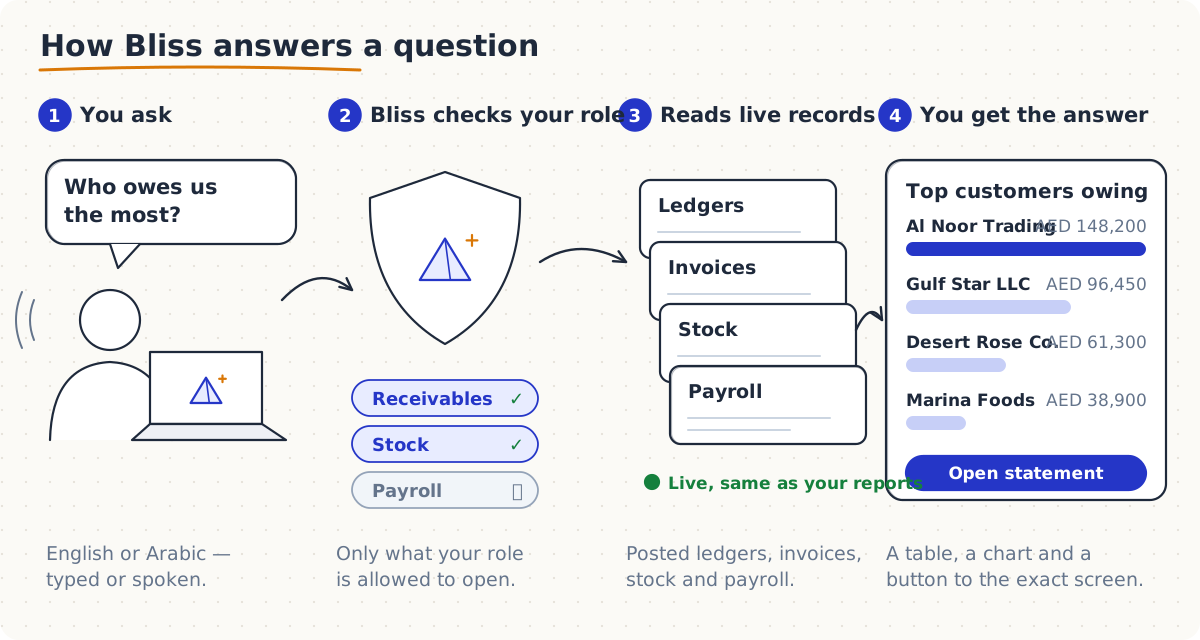
- You ask in English or Arabic — typed, or with the microphone. Bliss replies in the language you used and can read the answer aloud in a natural voice.
- Bliss checks your role. It looks only at the modules the user is allowed to open, so a storekeeper cannot reach payroll through a clever question.
- It reads your live records — the same posted ledgers, invoices, stock and payroll that your reports use. There is no separate copy to go out of date.
- You get the answer as a short reply, a table or a chart, with a button that opens the exact screen behind it.
Everyday questions — balances, stock, headcount, your plan — are answered straight from your company’s data without an AI model, so they are instant and use the fewest credits.
Creating data: four ways Bliss saves the typing
1. Chat it in — guided documents
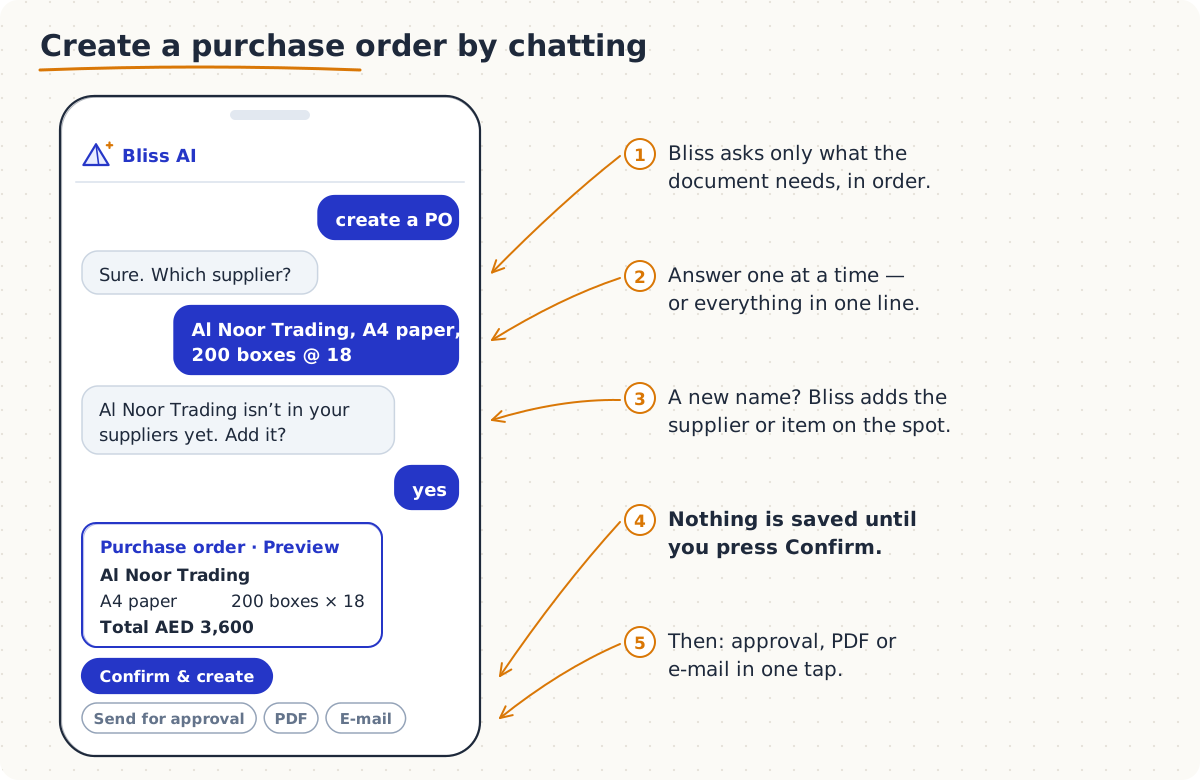
Type “create a PO” and Bliss asks only for what a purchase order needs, in order: supplier, item, quantity, price. Answer one question at a time, or everything in one line — “Al Noor Trading, A4 paper, 200 boxes @ 18”. If a name is not in your masters, Bliss offers to add the supplier, customer or item on the spot.
The end is always a preview. When you press Confirm & create, the document is saved through the same rules as the normal screen; then Bliss offers the next step — send for approval, print or save as PDF, or e-mail it to the supplier or customer.
| Document | Say something like |
|---|---|
| Purchase requisition | “PR for 30 boxes of A4 paper for the Dubai office” |
| Purchase order | “PO to Al Noor Trading, toner 85A, 40 @ 95” |
| Direct purchase | “direct purchase from City Hardware, 10 padlocks @ 22” |
| Sales order | “sales order for Gulf Star LLC, 120 cartons water” |
| Direct invoice | “invoice Marina Foods, 25 cartons rice @ 74” |
| Item, supplier or customer | “create customer Desert Rose Co., Sharjah” |
2. Snap it in — photos and PDFs
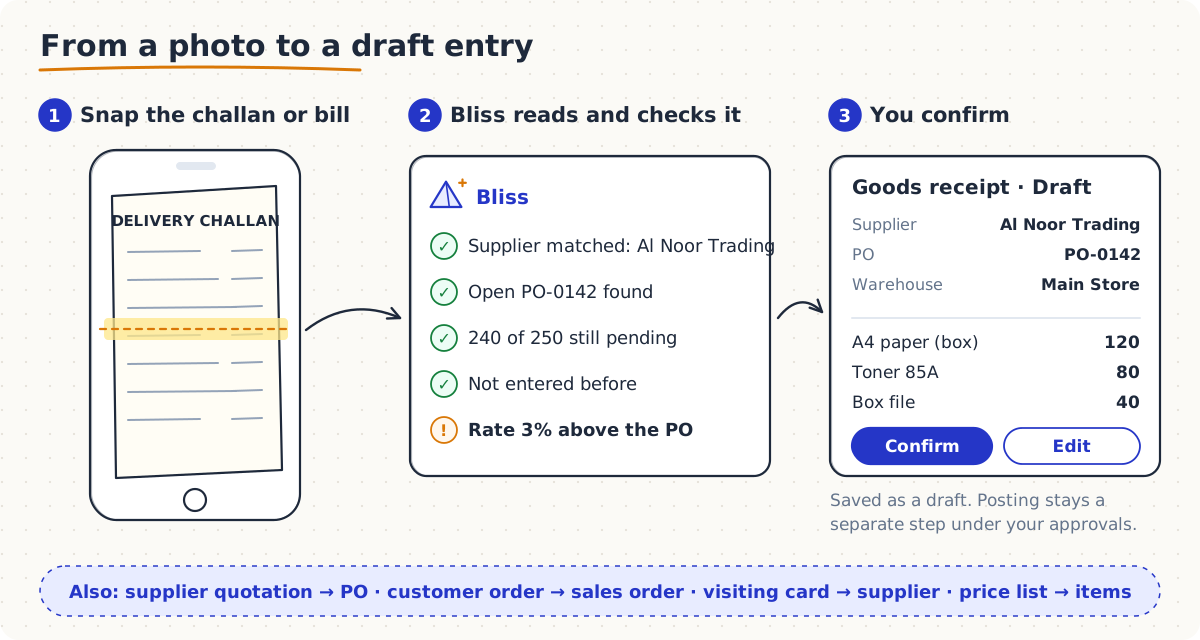
Most of your data already exists on paper or in a PDF. Send it to Bliss and it works out what the document is:
- Delivery note → goods receipt. Bliss matches the supplier and the open, approved purchase order, checks the quantity still pending against your receiving tolerance, and prepares a draft goods receipt.
- Supplier quotation → purchase order, with items matched by code first, then by name.
- Customer’s purchase order → sales order.
- Business card or letterhead → a new supplier or customer; a price list → items; a customer or supplier list → many parties, all in one review card.
- Supplier invoice → checked purchase invoice, with duplicate, price and bank-account checks and a risk score — a simple guard against duplicate payments and changed IBANs.
Whatever Bliss reads is saved as a draft. Posting stays a separate step, under your approval rules.
3. Say it in — one-line commands
Once documents exist, moving them forward takes a sentence: “delivery order for SO-12”, “deliver DO-3”, “invoice DO-7”, “send PO-0142 for approval”. Small masters work the same way — “create warehouse Al Quoz Store in Dubai”.
4. Set it up — a new company in one sitting
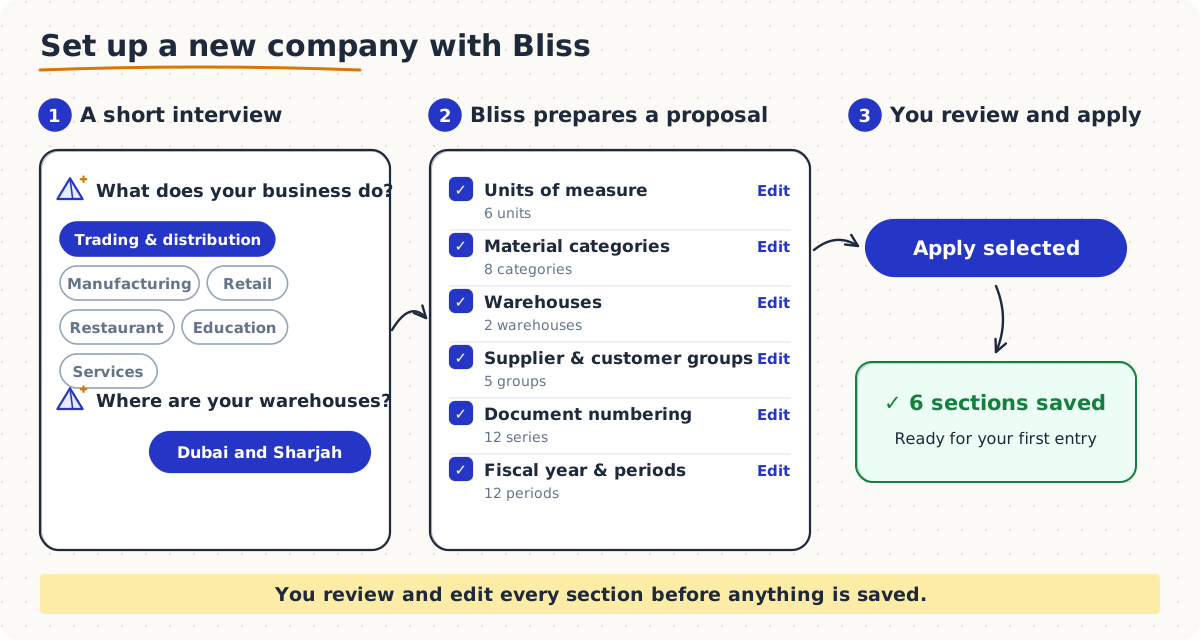
Starting fresh is usually the slowest part of any ERP. With Set up my company, Bliss asks a few questions — what the business does (trading, manufacturing, retail, restaurant, services or education) and where your warehouses are — and prepares a complete proposal: units of measure, item categories, warehouses, supplier and customer groups, document numbering, and the fiscal year with its periods. You edit any section, untick what you don’t need, and apply. Nothing is saved before you review it.
Understanding data: from numbers to reasons
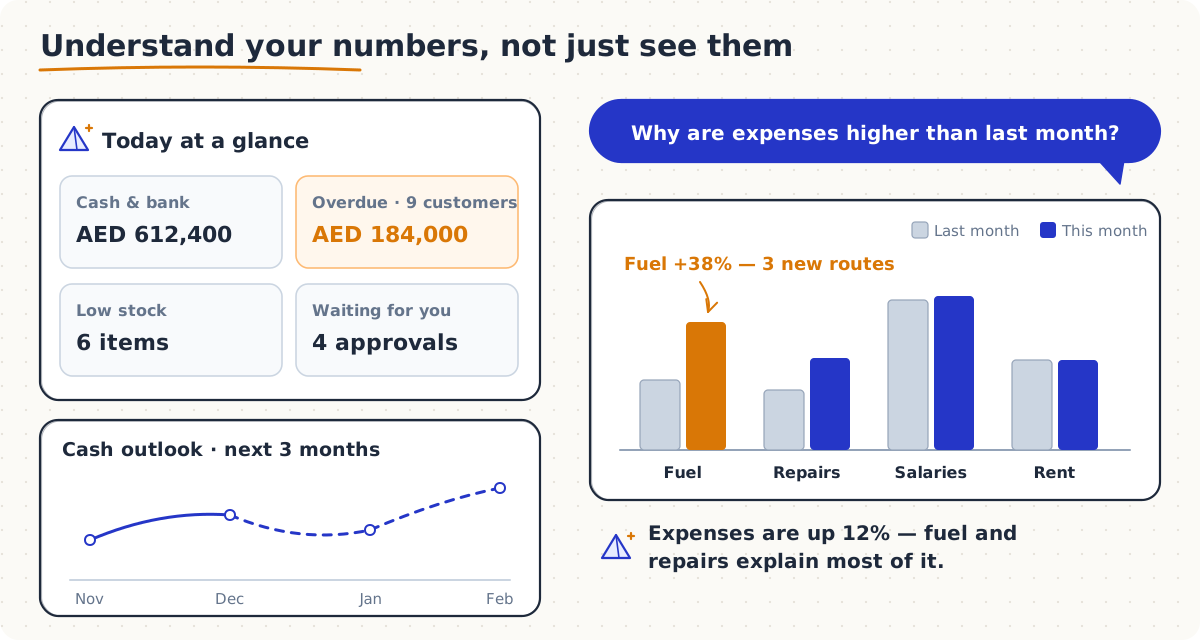
Reports tell you what happened. Bliss also tells you why, and what is likely to happen next:
| Ask | Bliss gives you |
|---|---|
| “daily brief” | Cash and bank, overdue receivables, low stock and what is waiting for your approval |
| “Why are expenses higher than last month?” | A month-on-month comparison with the accounts that drove the change |
| “Profit and loss this quarter” / “trial balance” | The statement from posted journals, with a button to open it |
| “Cash for the next 3 months” | Cash today plus expected receipts, minus supplier bills and salaries |
| “When will A4 paper run out?” | The run-out date at the current rate of use, and how much to reorder |
| “Who is likely to pay late?” | Customers scored from their overdue history, so collection starts with the right calls |
| “Headcount by department” | HR figures for each department |
| “Email Gulf Star LLC their statement” | The statement, sent to the customer’s e-mail |
When something goes wrong, ask Bliss first
Describe the problem the way you would tell a colleague — “the invoice won’t save”, “why is stock negative?”. Bliss recognises the issue and replies with what usually causes it, what to check in order, the screen to open, and whether you need your System Administrator. How-to questions such as “how do I return goods to a supplier?” come back with steps from Barkah’s Help & Guide — available in Arabic and English — and a button to the right screen.
Safe by design
- Your role, your limits. Bliss sees only what the person asking is allowed to open.
- Nothing saved without you. Every document and master record is a preview until someone presses Confirm; posting still follows your approvals, open periods and audit trail.
- Clear costs. Bliss runs on monthly credits. Quick answers from your own data cost the least; reading a page or creating a document is charged per item, so the administrator can see where credits go.
- It improves with you. A 👍 or 👎 under any answer goes to the Barkah team, who review it and teach Bliss the wording in a later release. Bliss never changes itself from one user’s feedback.
A day with Bliss
- 8:30 — The owner opens Bliss on the phone: “daily brief”. Cash in AED, nine overdue customers and four approvals waiting.
- 10:00 — The storekeeper photographs a delivery note. Bliss matches PO-0142, flags a 3% price difference, and a draft goods receipt is ready.
- 12:00 — The buyer types “PO to Al Noor Trading, A4 paper, 200 boxes @ 18”, adds the new supplier on the spot and sends the PO for approval.
- 15:00 — The credit controller asks “who is likely to pay late?” and starts with the top five calls.
- 17:00 — The accountant asks, in Arabic, why expenses rose. Fuel on three new routes — the answer goes into the monthly report.
Getting Bliss
Bliss AI is added to Barkah as a package with monthly credits — from Bliss Lite for questions and drafts up to Bliss Pro with forecasts, and Bliss Enterprise sized to your company. See pricing, or read how Barkah serves companies in the UAE and Saudi Arabia.
Frequently asked questions
What can Bliss AI create for me?
Purchase requisitions, purchase orders, direct purchases, sales orders and direct invoices from a chat; goods receipts, purchase orders and sales orders from a photo or PDF; suppliers, customers and items on their own; and a complete company setup from a short interview.
Does Bliss understand Arabic?
Yes. Ask in Arabic or English and Bliss replies in the language you used. Short answers and report summaries are written in Arabic; longer answers are translated on your device in up-to-date versions of Chrome, and shown in English where the browser cannot translate.
Does Bliss save anything without asking?
No. Every document and master record is shown as a preview and saved only when you press Confirm. Documents read from photos are saved as drafts, and posting still follows your approval workflow.
Which documents can Bliss read from a photo or PDF?
Delivery notes, supplier quotations, customer purchase orders, business cards and letterheads, price lists, customer or supplier lists, and supplier invoices.
Does Bliss work in AED and SAR?
Yes. Bliss answers from your Barkah books in your company currency — AED, SAR, QAR, OMR, KWD or BHD.
Can every user see everything through Bliss?
No. Bliss reads only what the user asking is allowed to open under their role.
Illustrations in this article are sketches with example names and figures, not screenshots. The features available depend on your Bliss package and your company’s settings.
Related
Ask Bliss your first question
Free 30-day trial · No installation · Support on WhatsApp
Start free trialWhatsApp +92 318 0418110